> ## Documentation Index
> Fetch the complete documentation index at: https://docs.jun.so/llms.txt
> Use this file to discover all available pages before exploring further.
# Your first signed-in card
> Show each signed-in customer their own plan, seats and renewal date as a card in the chat, then let them upgrade with one press.
A customer asks *"What plan am I on?"* or *"When do we renew?"* The AI looks up **their** account and answers with a card:
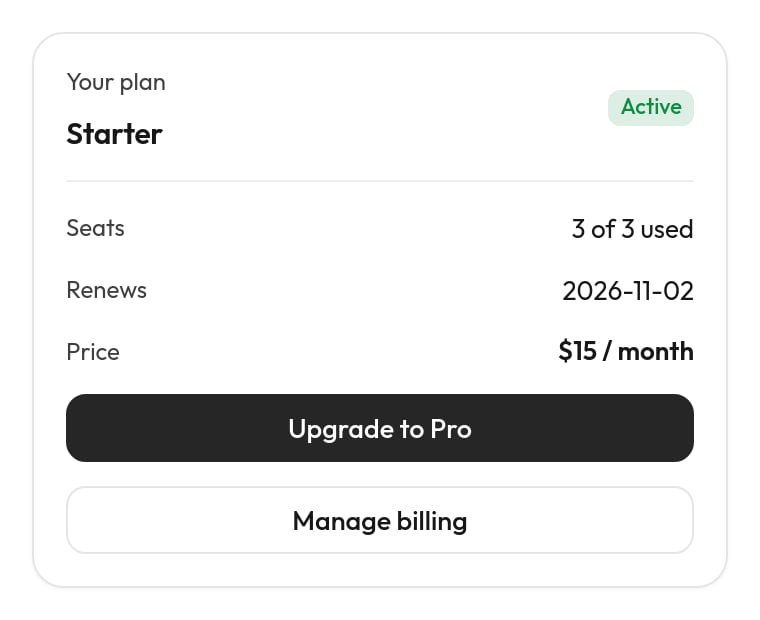 It's the right first card to build because it shows the one thing that makes account cards safe: **the customer is identified by your app, not by what they type.** Nobody can ask for someone else's plan, because the desk only ever looks up the account your app signed in.
**You'll build:**
| Piece | Where | What it does |
| - | - | - |
| Identity token | Your app (server + page) | Tells the chat who's signed in, signed with a secret only your server and the desk share. |
| Account endpoint | Your app (server) | `GET /support/accounts/:userId`: the plan, seats and renewal date, for the desk only. |
| `my_account` | Desk action | Calls the endpoint with `{user.id}`, the verified customer. |
| `account` | Desk widget | The card. |
| `upgrade_plan` | Desk action (part 2) | `POST`s the plan change; the card's **Upgrade to Pro** button runs it. |
| `account` | Desk task | When to look the account up, and the rules for upgrading. |
| `tests/account.yaml` | Desk tests | Keeps it working. |
About 30 minutes by hand, or a few minutes of reviewing with your AI.
The examples use a Node.js app with Express and a made-up `api.acme.com`. Swap in your own framework, address and data: the shape of each step stays the same. [Identify signed-in users](/widget/identify-users#server-examples) has the token code for Python, Ruby and PHP too.
## The fast way: ask your AI
With the desk's [MCP server](/code/mcp) connected in the editor where your app's code is open (Claude Code, Cursor, Codex), ask:
> Using the Jun MCP: let signed-in customers see their plan in the support chat. Set up identity verification for our app (server token + `JunDesk.identify`), add a `GET /support/accounts/:userId` endpoint protected by a support key, then on the desk create a `my_account` action, an `account` card (plan, status, seats, renewal, price, Manage billing link), a task and tests. Show me the card and the diff before anything goes live.
Your AI follows the same steps as below, with these tools: `set_identity` and `jun://guide/identity` (step 1), your code (steps 1–2), `set_key`, `create_action`, `try_action` (step 3), `create_widget` and `preview_widget` (step 4), `create_task` (step 5), `test_chat`, `add_test_case`, `run_tests` and `check_identity_token` (step 6). Read on to know what it should do, and to review its work.
## Part 1: the account card
**Turn it on.** On the desk, **Chat widget → Behaviour → Identify signed-in customers → Create identity secret** (or over MCP: `set_identity` with `turn: "on"`). Copy the `jis_…` secret into your server's environment:
```sh .env theme={null}
JUN_IDENTITY_SECRET=jis_…
```
Never commit it, never send it to the browser.
**Sign a token for the signed-in user.** Add an endpoint your pages call:
```js server/jun.js theme={null}
import jwt from "jsonwebtoken"; // npm i jsonwebtoken
// GET /api/jun-token: who's signed in, signed for the support chat.
app.get("/api/jun-token", requireSignedIn, (req, res) => {
const user = req.user;
const token = jwt.sign(
{
sub: String(user.id), // becomes {user.id}: use the same id your API uses
email: user.email,
name: user.name,
attributes: { plan: user.plan },
},
process.env.JUN_IDENTITY_SECRET,
{ algorithm: "HS256", expiresIn: "1h" },
);
res.json({ token });
});
```
`sub` must be the id your account endpoint (step 2) looks customers up by. If your sessions know a user id but your billing knows an account id, put the one the endpoint takes in `sub`, or look the other up in the endpoint.
**Hand it to the chat** in your app's front end, after sign-in and on every page load while signed in; log out of the chat when the customer signs out:
```js web/jun.js theme={null}
function junIdentify(token) {
if (window.JunDesk) window.JunDesk.identify(token);
else window.addEventListener("jundesk:ready", () => window.JunDesk.identify(token), { once: true });
}
export async function identifyForSupport() {
const res = await fetch("/api/jun-token");
if (res.ok) junIdentify((await res.json()).token);
}
export function signOutOfSupport() {
window.JunDesk?.logout();
}
```
Server-rendered pages can skip the fetch and put the token on the snippet instead: `data-user-token="<%= junToken %>"`.
**Check it:** sign in to your app and open a page with the chat. On the desk, **Visitors** shows you with your name and a ✓. Over MCP, `check_identity_token` with a token from `/api/jun-token` answers *Accepted* and the `{user.id}` it will use. If the chat stays anonymous, the browser console says why (`[Jun] identify failed: …`; see [Rejected tokens](/widget/identify-users#rejected-tokens)).
The desk calls your API from its server, so give it an endpoint that returns exactly what the card shows, protected by a key only the desk has.
Make a long random key and put it in your server's environment:
```sh theme={null}
openssl rand -hex 32
```
```sh .env theme={null}
SUPPORT_API_KEY=3f9c…
```
```js server/support.js theme={null}
import { timingSafeEqual } from "node:crypto";
// Only the support desk calls these routes, with SUPPORT_API_KEY.
function requireSupportKey(req, res, next) {
const expected = Buffer.from(`Bearer ${process.env.SUPPORT_API_KEY}`);
const given = Buffer.from(req.get("authorization") ?? "");
if (given.length !== expected.length || !timingSafeEqual(given, expected)) return res.status(401).json({ error: "Unauthorized" });
next();
}
// GET /support/accounts/:userId: what the customer may see about their own account.
app.get("/support/accounts/:userId", requireSupportKey, async (req, res) => {
const account = await db.accounts.findByUserId(req.params.userId);
if (!account) return res.status(404).json({ error: "No account for this user" });
res.json({
plan: account.plan, // "starter" | "pro" | "business"
status: account.status, // "active" | "past_due" | "canceled"
seats: account.seats,
seatsUsed: account.seatsUsed,
renewsOn: account.renewsOn.toISOString().slice(0, 10),
price: `$${account.monthlyPrice} / month`,
billingUrl: "https://app.acme.com/settings/billing",
});
});
```
Why this is safe: the endpoint trusts the `:userId` in the address because only the desk has the key, and the desk fills `{user.id}` only from a token your server signed. Return only what the customer may see: the answer goes into their chat. No card numbers, no internal notes, no other users.
Try it: `curl https://api.acme.com/support/accounts/u_123 -H "Authorization: Bearer $SUPPORT_API_KEY"`.
On the desk, **Agent → Actions → New action**. Say *"Look up the signed-in customer's own account: plan, seats, renewal date"* and paste the curl command from step 2. The key in it is saved on the desk as `ACME_SUPPORT_KEY` and the file only says `{secrets.ACME_SUPPORT_KEY}`. Then replace the `u_123` in the address with `{user.id}`.
The finished file:
```yaml actions/my_account.yaml theme={null}
description: Looks up the signed-in customer's own account (plan, status, seats, renewal date, price). Use it when they ask about their plan, billing, seats or renewal.
status: Checking your account
url: https://api.acme.com/support/accounts/{user.id}
headers:
Authorization: Bearer {secrets.ACME_SUPPORT_KEY}
pick: [plan, status, seats, seatsUsed, renewsOn, price]
widget: account
mock:
plan: starter
status: active
seats: 3
seatsUsed: 3
renewsOn: "2026-11-02"
price: $15 / month
billingUrl: https://app.acme.com/settings/billing
```
| Line | Why |
| - | - |
| `url: …/{user.id}` | The verified customer, never something they type. There are no `input`s: the AI has nothing to ask for, so it can't be talked into another account. |
| `headers` | The desk's key for your endpoint, as `{secrets.NAME}`. Paste it under **Keys** on the action's page if it isn't there yet (over MCP: `set_key`). |
| `pick` | What the AI reads. The card gets the whole answer, including `billingUrl`. |
| `widget: account` | Show a successful answer as the card from step 4. Add this line after the widget exists. |
| `mock` | The answer used by tests run with mock tools (step 6), where nobody is signed in. |
**Try it** on the action's page with a test customer: type the id of a real user from your app as the customer's id, press **Try it**, and you should see your endpoint's JSON. (Over MCP: `try_action` with `customer: { "id": "u_123" }`.)
From the Try it result, press **Show it as this widget**: the desk makes a first card from your real answer and links it to the action. Restyle it with the widget's **AI** tab ("a compact account card: plan as the title, a status badge, rows for seats, renewal and price, and a Manage billing button that opens billingUrl"), or paste this one into its **Code → Whole file**:
```json widgets/account.widget theme={null}
{
"version": "1.0",
"name": "Account",
"template": "{\"type\":\"Card\",\"size\":\"sm\",\"children\":[{\"type\":\"Row\",\"children\":[{\"type\":\"Col\",\"children\":[{\"type\":\"Caption\",\"value\":\"Your plan\"},{\"type\":\"Title\",\"value\":{{ (plan | title) | tojson }},\"size\":\"sm\"}]},{\"type\":\"Spacer\"},{\"type\":\"Badge\",\"label\":{{ (status | replace(\"_\", \" \") | capitalize) | tojson }},\"color\":{% if status == \"active\" %}\"success\"{% elif status == \"past_due\" %}\"danger\"{% else %}\"secondary\"{% endif %}}]},{\"type\":\"Divider\",\"flush\":true},{\"type\":\"Row\",\"children\":[{\"type\":\"Caption\",\"value\":\"Seats\"},{\"type\":\"Spacer\"},{\"type\":\"Text\",\"value\":{{ (seatsUsed ~ \" of \" ~ seats ~ \" used\") | tojson }},\"size\":\"sm\"}]},{\"type\":\"Row\",\"children\":[{\"type\":\"Caption\",\"value\":{% if status == \"canceled\" %}\"Ends\"{% else %}\"Renews\"{% endif %}},{\"type\":\"Spacer\"},{\"type\":\"Text\",\"value\":{{ renewsOn | tojson }},\"size\":\"sm\"}]},{\"type\":\"Row\",\"children\":[{\"type\":\"Caption\",\"value\":\"Price\"},{\"type\":\"Spacer\"},{\"type\":\"Text\",\"value\":{{ price | tojson }},\"size\":\"sm\",\"weight\":\"semibold\"}]},{\"type\":\"Button\",\"label\":\"Manage billing\",\"variant\":\"outline\",\"block\":true,\"onClickAction\":{\"type\":\"open_url\",\"payload\":{\"url\":{{ billingUrl | tojson }}}}}]}",
"summary": "{{ plan | title }} plan · {{ status | replace(\"_\", \" \") }}",
"sample": {
"plan": "pro",
"status": "active",
"seats": 10,
"seatsUsed": 8,
"renewsOn": "2026-11-02",
"price": "$49 / month",
"billingUrl": "https://app.acme.com/settings/billing"
},
"states": [
{
"name": "Starter",
"data": { "plan": "starter", "status": "active", "seats": 3, "seatsUsed": 3, "renewsOn": "2026-11-02", "price": "$15 / month", "billingUrl": "https://app.acme.com/settings/billing" }
},
{
"name": "Past due",
"data": { "plan": "pro", "status": "past_due", "seats": 10, "seatsUsed": 8, "renewsOn": "2026-11-02", "price": "$49 / month", "billingUrl": "https://app.acme.com/settings/billing" }
}
]
}
```
The template, readable:
```jinja theme={null}
{"type":"Card","size":"sm","children":[
{"type":"Row","children":[
{"type":"Col","children":[
{"type":"Caption","value":"Your plan"},
{"type":"Title","value":{{ (plan | title) | tojson }},"size":"sm"}]},
{"type":"Spacer"},
{"type":"Badge","label":{{ (status | replace("_", " ") | capitalize) | tojson }},
"color":{% if status == "active" %}"success"{% elif status == "past_due" %}"danger"{% else %}"secondary"{% endif %}}]},
{"type":"Divider","flush":true},
{"type":"Row","children":[{"type":"Caption","value":"Seats"},{"type":"Spacer"},
{"type":"Text","value":{{ (seatsUsed ~ " of " ~ seats ~ " used") | tojson }},"size":"sm"}]},
{"type":"Row","children":[{"type":"Caption","value":{% if status == "canceled" %}"Ends"{% else %}"Renews"{% endif %}},{"type":"Spacer"},
{"type":"Text","value":{{ renewsOn | tojson }},"size":"sm"}]},
{"type":"Row","children":[{"type":"Caption","value":"Price"},{"type":"Spacer"},
{"type":"Text","value":{{ price | tojson }},"size":"sm","weight":"semibold"}]},
{"type":"Button","label":"Manage billing","variant":"outline","block":true,
"onClickAction":{"type":"open_url","payload":{"url":{{ billingUrl | tojson }}}}}
]}
```
* Every value goes through `| tojson`, so a missing field is `null` instead of broken JSON.
* **Manage billing** is an `open_url` button: it opens the link in the customer's browser and is never sent to the desk.
* The **states** let you check the card in each case: pick *Starter* and *Past due* in the preview (over MCP: `preview_widget` with `state`, light and dark).
* The **summary** is the line the chat shows when it folds the card away: *Pro plan · active*.
Then add `widget: account` to the action, if **Show it as this widget** didn't already.
**Agent → Tasks → New task**: *"The customer asks about their plan, billing, seats, renewal date, or upgrading."* The finished file:
```markdown tasks/account.md theme={null}
---
description: The customer asks about their plan, billing, seats, renewal date, or upgrading.
---
1. Look up their account with @my_account. The card shows the details, so don't repeat them: answer their actual question in a sentence or two.
2. If they want to upgrade and they're on Starter, say exactly what changes: Pro, 10 seats, $49 a month from today, on their next invoice. Run @upgrade_plan only after a clear yes, or when they press Upgrade to Pro on the card.
3. If @my_account fails because they aren't signed in, ask them to sign in to the app and open the chat again. Never look an account up by an email or id they type.
4. Refunds, cancellations and invoice disputes go to a person.
```
Step 2 names `@upgrade_plan`, which you'll add in part 2. Until then, leave step 2 out, or the task's page warns that the action doesn't exist.
**In the test chat.** On the task's **Test** tab, set the test customer's id to a real user from your app, and ask *"What plan am I on?"* The AI calls `my_account` and the card appears with that user's data. Then clear the customer and ask again: the AI should ask you to sign in, with no card. (Over MCP: `test_chat` with and without `customer`.)
**As test cases.** Test cases run as an anonymous visitor, so they use the action's `mock`:
```yaml tests/account.yaml theme={null}
- name: plan question shows the account card
message: what plan are we on?
expect:
outcome: answer
tools: [my_account]
widget: account
- name: renewal question is answered from the account
message: when does our subscription renew?
expect:
tools: [my_account]
criteria: Answers with the renewal date from the account and doesn't invent a different one.
```
Run them with mock tools: `jun eval --mock-tools` with the [CLI](/code/cli), or `run_tests` with `mockTools: true` over MCP. The desk's **Run tests** button calls actions for real as an anonymous visitor, so `my_account` fails there by design.
**Save** on the Agent page. It's live.
**On your app.** Sign in, open the chat, ask *"what plan are we on?"* The card shows your plan. In the desk's inbox the conversation has your verified contact (✓) and, under the AI's message, the `my_account` call in the audit log.
## Part 2: an upgrade button
Now let a customer on Starter upgrade from the card. The button runs an action directly: pressing it is the customer's yes, so there's no extra question, and the action answers the press itself with a line instead of an AI reply.
```js server/support.js theme={null}
// POST /support/accounts/:userId/plan { plan: "pro" }
app.post("/support/accounts/:userId/plan", requireSupportKey, express.json(), async (req, res) => {
const { plan } = req.body ?? {};
if (!["starter", "pro"].includes(plan)) return res.status(400).json({ error: "Unknown plan" });
const account = await db.accounts.findByUserId(req.params.userId);
if (!account) return res.status(404).json({ error: "No account for this user" });
if (!account.canChangePlan) return res.status(403).json({ error: "Only an admin of this account can change its plan" });
await billing.changePlan(account, plan); // your billing provider: prorate, invoice, etc.
res.json({ plan, price: plan === "pro" ? "$49 / month" : "$15 / month" });
});
```
Your rules still apply here: who may change the plan (an account admin?), what's allowed, what's invoiced. The desk only passes on who's asking.
```yaml actions/upgrade_plan.yaml theme={null}
description: Moves the signed-in customer to another plan. Only after they said yes to the exact change.
status: Changing your plan
method: POST
url: https://api.acme.com/support/accounts/{user.id}/plan
headers:
Authorization: Bearer {secrets.ACME_SUPPORT_KEY}
body:
plan: "{plan}"
input:
plan: { type: string, enum: [starter, pro], description: The plan to move to }
widget_done: "You're on {{ plan | title }} now. The change shows on your next invoice."
widget_failed: That didn't go through, and nothing changed. Please try again.
```
* `{user.id}` again: the change can only ever go to the signed-in account.
* `enum` keeps the AI (and the button) to plans that exist.
* `widget_done` / `widget_failed` answer a button press directly: on success the card folds to *"You're on Pro now…"*; on an error it stays open with the failed line.
**Try it** with **Run it for real** only on a test account: it really changes the plan.
In the template, put this before the **Manage billing** button, so it shows only on Starter:
```jinja theme={null}
{% if plan == "starter" %}{"type":"Button","label":"Upgrade to Pro","style":"primary","block":true,
"onClickAction":{"type":"tool:upgrade_plan","payload":{"plan":"pro"}}},{% endif %}
```
Or ask the widget's AI: *"On Starter only, add a primary Upgrade to Pro button above Manage billing that runs upgrade\_plan with plan pro."* **Details → Connected** should now say the button runs `upgrade_plan`, with no warning about a missing input (`plan` comes from the payload).
Preview the *Starter* state: the button is there. Preview the default (Pro): it's not.
Add step 2 of the task (above) if you left it out. Then in the test chat, as a test customer on Starter: ask *"what plan am I on?"*, press **Upgrade to Pro**. With **real changes** off the press is pretended and the card folds to the done line; nothing changes in your system.
Add a test that the AI never upgrades without a yes:
```yaml tests/account.yaml theme={null}
- name: asking to upgrade explains the change first
message: upgrade us to pro
expect:
criteria: Says what changes (Pro, 10 seats, $49 a month, from the next invoice) and asks for a yes before changing anything.
```
Save. It's live.
## Why it's safe
* **The account comes from your app's signature.** `{user.id}` is filled only from a token your server signed with the identity secret. A visitor who isn't signed in has no `{user.id}`, so `my_account` and `upgrade_plan` don't run for them at all. Typing *"I'm user u\_123"* changes nothing.
* **The AI never chooses the account.** Neither action has an input for it, and the task tells the AI not to look anyone up by what they type.
* **Your endpoint has the final say.** It checks the desk's key, and still applies your own rules (who may change the plan, which plans exist).
* **A change needs a yes.** The AI must say what changes and wait for a clear yes; a button press is that yes, for exactly the plan on the button.
* **Everything is on record.** Each call is in the conversation's audit log on the desk, with what was sent and what came back (keys masked).
## When it doesn't work
| What you see | Why, and what to do |
| - | - |
| The AI asks the customer to sign in, though they are | The chat didn't get a valid token. The browser console says `[Jun] identify failed: …`. Check the token with `check_identity_token`; *signature doesn't match* means a wrong or rotated secret. |
| **Not set up** on the action | Its key isn't on the desk. Paste `ACME_SUPPORT_KEY` under **Keys** (or `set_key`). |
| The call answers `401` | The desk's `ACME_SUPPORT_KEY` and your server's `SUPPORT_API_KEY` differ. |
| The call answers `404` | The token's `sub` isn't the id your endpoint looks up. Use the same id in both (step 1's warning). |
| The card shows empty rows | Your endpoint's field names differ from the card's. Run **Try it**, then **Use as the widget's example data**, and match the template to your names. |
| No card, only text | The answer wasn't JSON, or the template failed. The audit log says which. |
| **Upgrade to Pro** says the failed line | Your plan endpoint answered with an error. The audit log has its status and body. |
Claims, merging and user secrets in detail.
Every component, button type and template feature.
Placeholders, keys, Try it and the audit log.
Build recipes like this one with one request.
This documentation is built and hosted on [Mintlify](https://mintlify.com), a developer documentation platform.
It's the right first card to build because it shows the one thing that makes account cards safe: **the customer is identified by your app, not by what they type.** Nobody can ask for someone else's plan, because the desk only ever looks up the account your app signed in.
**You'll build:**
| Piece | Where | What it does |
| - | - | - |
| Identity token | Your app (server + page) | Tells the chat who's signed in, signed with a secret only your server and the desk share. |
| Account endpoint | Your app (server) | `GET /support/accounts/:userId`: the plan, seats and renewal date, for the desk only. |
| `my_account` | Desk action | Calls the endpoint with `{user.id}`, the verified customer. |
| `account` | Desk widget | The card. |
| `upgrade_plan` | Desk action (part 2) | `POST`s the plan change; the card's **Upgrade to Pro** button runs it. |
| `account` | Desk task | When to look the account up, and the rules for upgrading. |
| `tests/account.yaml` | Desk tests | Keeps it working. |
About 30 minutes by hand, or a few minutes of reviewing with your AI.
The examples use a Node.js app with Express and a made-up `api.acme.com`. Swap in your own framework, address and data: the shape of each step stays the same. [Identify signed-in users](/widget/identify-users#server-examples) has the token code for Python, Ruby and PHP too.
## The fast way: ask your AI
With the desk's [MCP server](/code/mcp) connected in the editor where your app's code is open (Claude Code, Cursor, Codex), ask:
> Using the Jun MCP: let signed-in customers see their plan in the support chat. Set up identity verification for our app (server token + `JunDesk.identify`), add a `GET /support/accounts/:userId` endpoint protected by a support key, then on the desk create a `my_account` action, an `account` card (plan, status, seats, renewal, price, Manage billing link), a task and tests. Show me the card and the diff before anything goes live.
Your AI follows the same steps as below, with these tools: `set_identity` and `jun://guide/identity` (step 1), your code (steps 1–2), `set_key`, `create_action`, `try_action` (step 3), `create_widget` and `preview_widget` (step 4), `create_task` (step 5), `test_chat`, `add_test_case`, `run_tests` and `check_identity_token` (step 6). Read on to know what it should do, and to review its work.
## Part 1: the account card
**Turn it on.** On the desk, **Chat widget → Behaviour → Identify signed-in customers → Create identity secret** (or over MCP: `set_identity` with `turn: "on"`). Copy the `jis_…` secret into your server's environment:
```sh .env theme={null}
JUN_IDENTITY_SECRET=jis_…
```
Never commit it, never send it to the browser.
**Sign a token for the signed-in user.** Add an endpoint your pages call:
```js server/jun.js theme={null}
import jwt from "jsonwebtoken"; // npm i jsonwebtoken
// GET /api/jun-token: who's signed in, signed for the support chat.
app.get("/api/jun-token", requireSignedIn, (req, res) => {
const user = req.user;
const token = jwt.sign(
{
sub: String(user.id), // becomes {user.id}: use the same id your API uses
email: user.email,
name: user.name,
attributes: { plan: user.plan },
},
process.env.JUN_IDENTITY_SECRET,
{ algorithm: "HS256", expiresIn: "1h" },
);
res.json({ token });
});
```
`sub` must be the id your account endpoint (step 2) looks customers up by. If your sessions know a user id but your billing knows an account id, put the one the endpoint takes in `sub`, or look the other up in the endpoint.
**Hand it to the chat** in your app's front end, after sign-in and on every page load while signed in; log out of the chat when the customer signs out:
```js web/jun.js theme={null}
function junIdentify(token) {
if (window.JunDesk) window.JunDesk.identify(token);
else window.addEventListener("jundesk:ready", () => window.JunDesk.identify(token), { once: true });
}
export async function identifyForSupport() {
const res = await fetch("/api/jun-token");
if (res.ok) junIdentify((await res.json()).token);
}
export function signOutOfSupport() {
window.JunDesk?.logout();
}
```
Server-rendered pages can skip the fetch and put the token on the snippet instead: `data-user-token="<%= junToken %>"`.
**Check it:** sign in to your app and open a page with the chat. On the desk, **Visitors** shows you with your name and a ✓. Over MCP, `check_identity_token` with a token from `/api/jun-token` answers *Accepted* and the `{user.id}` it will use. If the chat stays anonymous, the browser console says why (`[Jun] identify failed: …`; see [Rejected tokens](/widget/identify-users#rejected-tokens)).
The desk calls your API from its server, so give it an endpoint that returns exactly what the card shows, protected by a key only the desk has.
Make a long random key and put it in your server's environment:
```sh theme={null}
openssl rand -hex 32
```
```sh .env theme={null}
SUPPORT_API_KEY=3f9c…
```
```js server/support.js theme={null}
import { timingSafeEqual } from "node:crypto";
// Only the support desk calls these routes, with SUPPORT_API_KEY.
function requireSupportKey(req, res, next) {
const expected = Buffer.from(`Bearer ${process.env.SUPPORT_API_KEY}`);
const given = Buffer.from(req.get("authorization") ?? "");
if (given.length !== expected.length || !timingSafeEqual(given, expected)) return res.status(401).json({ error: "Unauthorized" });
next();
}
// GET /support/accounts/:userId: what the customer may see about their own account.
app.get("/support/accounts/:userId", requireSupportKey, async (req, res) => {
const account = await db.accounts.findByUserId(req.params.userId);
if (!account) return res.status(404).json({ error: "No account for this user" });
res.json({
plan: account.plan, // "starter" | "pro" | "business"
status: account.status, // "active" | "past_due" | "canceled"
seats: account.seats,
seatsUsed: account.seatsUsed,
renewsOn: account.renewsOn.toISOString().slice(0, 10),
price: `$${account.monthlyPrice} / month`,
billingUrl: "https://app.acme.com/settings/billing",
});
});
```
Why this is safe: the endpoint trusts the `:userId` in the address because only the desk has the key, and the desk fills `{user.id}` only from a token your server signed. Return only what the customer may see: the answer goes into their chat. No card numbers, no internal notes, no other users.
Try it: `curl https://api.acme.com/support/accounts/u_123 -H "Authorization: Bearer $SUPPORT_API_KEY"`.
On the desk, **Agent → Actions → New action**. Say *"Look up the signed-in customer's own account: plan, seats, renewal date"* and paste the curl command from step 2. The key in it is saved on the desk as `ACME_SUPPORT_KEY` and the file only says `{secrets.ACME_SUPPORT_KEY}`. Then replace the `u_123` in the address with `{user.id}`.
The finished file:
```yaml actions/my_account.yaml theme={null}
description: Looks up the signed-in customer's own account (plan, status, seats, renewal date, price). Use it when they ask about their plan, billing, seats or renewal.
status: Checking your account
url: https://api.acme.com/support/accounts/{user.id}
headers:
Authorization: Bearer {secrets.ACME_SUPPORT_KEY}
pick: [plan, status, seats, seatsUsed, renewsOn, price]
widget: account
mock:
plan: starter
status: active
seats: 3
seatsUsed: 3
renewsOn: "2026-11-02"
price: $15 / month
billingUrl: https://app.acme.com/settings/billing
```
| Line | Why |
| - | - |
| `url: …/{user.id}` | The verified customer, never something they type. There are no `input`s: the AI has nothing to ask for, so it can't be talked into another account. |
| `headers` | The desk's key for your endpoint, as `{secrets.NAME}`. Paste it under **Keys** on the action's page if it isn't there yet (over MCP: `set_key`). |
| `pick` | What the AI reads. The card gets the whole answer, including `billingUrl`. |
| `widget: account` | Show a successful answer as the card from step 4. Add this line after the widget exists. |
| `mock` | The answer used by tests run with mock tools (step 6), where nobody is signed in. |
**Try it** on the action's page with a test customer: type the id of a real user from your app as the customer's id, press **Try it**, and you should see your endpoint's JSON. (Over MCP: `try_action` with `customer: { "id": "u_123" }`.)
From the Try it result, press **Show it as this widget**: the desk makes a first card from your real answer and links it to the action. Restyle it with the widget's **AI** tab ("a compact account card: plan as the title, a status badge, rows for seats, renewal and price, and a Manage billing button that opens billingUrl"), or paste this one into its **Code → Whole file**:
```json widgets/account.widget theme={null}
{
"version": "1.0",
"name": "Account",
"template": "{\"type\":\"Card\",\"size\":\"sm\",\"children\":[{\"type\":\"Row\",\"children\":[{\"type\":\"Col\",\"children\":[{\"type\":\"Caption\",\"value\":\"Your plan\"},{\"type\":\"Title\",\"value\":{{ (plan | title) | tojson }},\"size\":\"sm\"}]},{\"type\":\"Spacer\"},{\"type\":\"Badge\",\"label\":{{ (status | replace(\"_\", \" \") | capitalize) | tojson }},\"color\":{% if status == \"active\" %}\"success\"{% elif status == \"past_due\" %}\"danger\"{% else %}\"secondary\"{% endif %}}]},{\"type\":\"Divider\",\"flush\":true},{\"type\":\"Row\",\"children\":[{\"type\":\"Caption\",\"value\":\"Seats\"},{\"type\":\"Spacer\"},{\"type\":\"Text\",\"value\":{{ (seatsUsed ~ \" of \" ~ seats ~ \" used\") | tojson }},\"size\":\"sm\"}]},{\"type\":\"Row\",\"children\":[{\"type\":\"Caption\",\"value\":{% if status == \"canceled\" %}\"Ends\"{% else %}\"Renews\"{% endif %}},{\"type\":\"Spacer\"},{\"type\":\"Text\",\"value\":{{ renewsOn | tojson }},\"size\":\"sm\"}]},{\"type\":\"Row\",\"children\":[{\"type\":\"Caption\",\"value\":\"Price\"},{\"type\":\"Spacer\"},{\"type\":\"Text\",\"value\":{{ price | tojson }},\"size\":\"sm\",\"weight\":\"semibold\"}]},{\"type\":\"Button\",\"label\":\"Manage billing\",\"variant\":\"outline\",\"block\":true,\"onClickAction\":{\"type\":\"open_url\",\"payload\":{\"url\":{{ billingUrl | tojson }}}}}]}",
"summary": "{{ plan | title }} plan · {{ status | replace(\"_\", \" \") }}",
"sample": {
"plan": "pro",
"status": "active",
"seats": 10,
"seatsUsed": 8,
"renewsOn": "2026-11-02",
"price": "$49 / month",
"billingUrl": "https://app.acme.com/settings/billing"
},
"states": [
{
"name": "Starter",
"data": { "plan": "starter", "status": "active", "seats": 3, "seatsUsed": 3, "renewsOn": "2026-11-02", "price": "$15 / month", "billingUrl": "https://app.acme.com/settings/billing" }
},
{
"name": "Past due",
"data": { "plan": "pro", "status": "past_due", "seats": 10, "seatsUsed": 8, "renewsOn": "2026-11-02", "price": "$49 / month", "billingUrl": "https://app.acme.com/settings/billing" }
}
]
}
```
The template, readable:
```jinja theme={null}
{"type":"Card","size":"sm","children":[
{"type":"Row","children":[
{"type":"Col","children":[
{"type":"Caption","value":"Your plan"},
{"type":"Title","value":{{ (plan | title) | tojson }},"size":"sm"}]},
{"type":"Spacer"},
{"type":"Badge","label":{{ (status | replace("_", " ") | capitalize) | tojson }},
"color":{% if status == "active" %}"success"{% elif status == "past_due" %}"danger"{% else %}"secondary"{% endif %}}]},
{"type":"Divider","flush":true},
{"type":"Row","children":[{"type":"Caption","value":"Seats"},{"type":"Spacer"},
{"type":"Text","value":{{ (seatsUsed ~ " of " ~ seats ~ " used") | tojson }},"size":"sm"}]},
{"type":"Row","children":[{"type":"Caption","value":{% if status == "canceled" %}"Ends"{% else %}"Renews"{% endif %}},{"type":"Spacer"},
{"type":"Text","value":{{ renewsOn | tojson }},"size":"sm"}]},
{"type":"Row","children":[{"type":"Caption","value":"Price"},{"type":"Spacer"},
{"type":"Text","value":{{ price | tojson }},"size":"sm","weight":"semibold"}]},
{"type":"Button","label":"Manage billing","variant":"outline","block":true,
"onClickAction":{"type":"open_url","payload":{"url":{{ billingUrl | tojson }}}}}
]}
```
* Every value goes through `| tojson`, so a missing field is `null` instead of broken JSON.
* **Manage billing** is an `open_url` button: it opens the link in the customer's browser and is never sent to the desk.
* The **states** let you check the card in each case: pick *Starter* and *Past due* in the preview (over MCP: `preview_widget` with `state`, light and dark).
* The **summary** is the line the chat shows when it folds the card away: *Pro plan · active*.
Then add `widget: account` to the action, if **Show it as this widget** didn't already.
**Agent → Tasks → New task**: *"The customer asks about their plan, billing, seats, renewal date, or upgrading."* The finished file:
```markdown tasks/account.md theme={null}
---
description: The customer asks about their plan, billing, seats, renewal date, or upgrading.
---
1. Look up their account with @my_account. The card shows the details, so don't repeat them: answer their actual question in a sentence or two.
2. If they want to upgrade and they're on Starter, say exactly what changes: Pro, 10 seats, $49 a month from today, on their next invoice. Run @upgrade_plan only after a clear yes, or when they press Upgrade to Pro on the card.
3. If @my_account fails because they aren't signed in, ask them to sign in to the app and open the chat again. Never look an account up by an email or id they type.
4. Refunds, cancellations and invoice disputes go to a person.
```
Step 2 names `@upgrade_plan`, which you'll add in part 2. Until then, leave step 2 out, or the task's page warns that the action doesn't exist.
**In the test chat.** On the task's **Test** tab, set the test customer's id to a real user from your app, and ask *"What plan am I on?"* The AI calls `my_account` and the card appears with that user's data. Then clear the customer and ask again: the AI should ask you to sign in, with no card. (Over MCP: `test_chat` with and without `customer`.)
**As test cases.** Test cases run as an anonymous visitor, so they use the action's `mock`:
```yaml tests/account.yaml theme={null}
- name: plan question shows the account card
message: what plan are we on?
expect:
outcome: answer
tools: [my_account]
widget: account
- name: renewal question is answered from the account
message: when does our subscription renew?
expect:
tools: [my_account]
criteria: Answers with the renewal date from the account and doesn't invent a different one.
```
Run them with mock tools: `jun eval --mock-tools` with the [CLI](/code/cli), or `run_tests` with `mockTools: true` over MCP. The desk's **Run tests** button calls actions for real as an anonymous visitor, so `my_account` fails there by design.
**Save** on the Agent page. It's live.
**On your app.** Sign in, open the chat, ask *"what plan are we on?"* The card shows your plan. In the desk's inbox the conversation has your verified contact (✓) and, under the AI's message, the `my_account` call in the audit log.
## Part 2: an upgrade button
Now let a customer on Starter upgrade from the card. The button runs an action directly: pressing it is the customer's yes, so there's no extra question, and the action answers the press itself with a line instead of an AI reply.
```js server/support.js theme={null}
// POST /support/accounts/:userId/plan { plan: "pro" }
app.post("/support/accounts/:userId/plan", requireSupportKey, express.json(), async (req, res) => {
const { plan } = req.body ?? {};
if (!["starter", "pro"].includes(plan)) return res.status(400).json({ error: "Unknown plan" });
const account = await db.accounts.findByUserId(req.params.userId);
if (!account) return res.status(404).json({ error: "No account for this user" });
if (!account.canChangePlan) return res.status(403).json({ error: "Only an admin of this account can change its plan" });
await billing.changePlan(account, plan); // your billing provider: prorate, invoice, etc.
res.json({ plan, price: plan === "pro" ? "$49 / month" : "$15 / month" });
});
```
Your rules still apply here: who may change the plan (an account admin?), what's allowed, what's invoiced. The desk only passes on who's asking.
```yaml actions/upgrade_plan.yaml theme={null}
description: Moves the signed-in customer to another plan. Only after they said yes to the exact change.
status: Changing your plan
method: POST
url: https://api.acme.com/support/accounts/{user.id}/plan
headers:
Authorization: Bearer {secrets.ACME_SUPPORT_KEY}
body:
plan: "{plan}"
input:
plan: { type: string, enum: [starter, pro], description: The plan to move to }
widget_done: "You're on {{ plan | title }} now. The change shows on your next invoice."
widget_failed: That didn't go through, and nothing changed. Please try again.
```
* `{user.id}` again: the change can only ever go to the signed-in account.
* `enum` keeps the AI (and the button) to plans that exist.
* `widget_done` / `widget_failed` answer a button press directly: on success the card folds to *"You're on Pro now…"*; on an error it stays open with the failed line.
**Try it** with **Run it for real** only on a test account: it really changes the plan.
In the template, put this before the **Manage billing** button, so it shows only on Starter:
```jinja theme={null}
{% if plan == "starter" %}{"type":"Button","label":"Upgrade to Pro","style":"primary","block":true,
"onClickAction":{"type":"tool:upgrade_plan","payload":{"plan":"pro"}}},{% endif %}
```
Or ask the widget's AI: *"On Starter only, add a primary Upgrade to Pro button above Manage billing that runs upgrade\_plan with plan pro."* **Details → Connected** should now say the button runs `upgrade_plan`, with no warning about a missing input (`plan` comes from the payload).
Preview the *Starter* state: the button is there. Preview the default (Pro): it's not.
Add step 2 of the task (above) if you left it out. Then in the test chat, as a test customer on Starter: ask *"what plan am I on?"*, press **Upgrade to Pro**. With **real changes** off the press is pretended and the card folds to the done line; nothing changes in your system.
Add a test that the AI never upgrades without a yes:
```yaml tests/account.yaml theme={null}
- name: asking to upgrade explains the change first
message: upgrade us to pro
expect:
criteria: Says what changes (Pro, 10 seats, $49 a month, from the next invoice) and asks for a yes before changing anything.
```
Save. It's live.
## Why it's safe
* **The account comes from your app's signature.** `{user.id}` is filled only from a token your server signed with the identity secret. A visitor who isn't signed in has no `{user.id}`, so `my_account` and `upgrade_plan` don't run for them at all. Typing *"I'm user u\_123"* changes nothing.
* **The AI never chooses the account.** Neither action has an input for it, and the task tells the AI not to look anyone up by what they type.
* **Your endpoint has the final say.** It checks the desk's key, and still applies your own rules (who may change the plan, which plans exist).
* **A change needs a yes.** The AI must say what changes and wait for a clear yes; a button press is that yes, for exactly the plan on the button.
* **Everything is on record.** Each call is in the conversation's audit log on the desk, with what was sent and what came back (keys masked).
## When it doesn't work
| What you see | Why, and what to do |
| - | - |
| The AI asks the customer to sign in, though they are | The chat didn't get a valid token. The browser console says `[Jun] identify failed: …`. Check the token with `check_identity_token`; *signature doesn't match* means a wrong or rotated secret. |
| **Not set up** on the action | Its key isn't on the desk. Paste `ACME_SUPPORT_KEY` under **Keys** (or `set_key`). |
| The call answers `401` | The desk's `ACME_SUPPORT_KEY` and your server's `SUPPORT_API_KEY` differ. |
| The call answers `404` | The token's `sub` isn't the id your endpoint looks up. Use the same id in both (step 1's warning). |
| The card shows empty rows | Your endpoint's field names differ from the card's. Run **Try it**, then **Use as the widget's example data**, and match the template to your names. |
| No card, only text | The answer wasn't JSON, or the template failed. The audit log says which. |
| **Upgrade to Pro** says the failed line | Your plan endpoint answered with an error. The audit log has its status and body. |
Claims, merging and user secrets in detail.
Every component, button type and template feature.
Placeholders, keys, Try it and the audit log.
Build recipes like this one with one request.
This documentation is built and hosted on [Mintlify](https://mintlify.com), a developer documentation platform.